


Sound Profile (Volume control)
3.72.27K Reviews
App Specs
- Version
- 13.03
- Updated On
- License
- Free
- Downloads
- 1,000,000+
- Developer
- Corcanoe
- Categories
- Personalization
- Platform
- Android
Screenshots

 Analysis by AppCompare
I usually notice how much I need separate volume controls at the worst possible moment: a call rings loudly in a quiet room, or an important notification disappears into a low setting left over from the night before. Sound Profile is built around preventing that sort of mismatch. Its appeal is less about adding entertainment to a phone and more about making sound settings fit the place and task I’m dealing with.
That focus gives it a practical first-week appeal. It is a free personalization app from Corcanoe, with optional in-app purchases, and its basic idea is easy to understand: set up sound profiles for different situations instead of repeatedly adjusting individual sliders. The approach is useful when a phone moves between work, home, travel, and sleep, but it only earns a lasting place if the profiles match routines I actually keep.
The first week: turning sound settings into routines
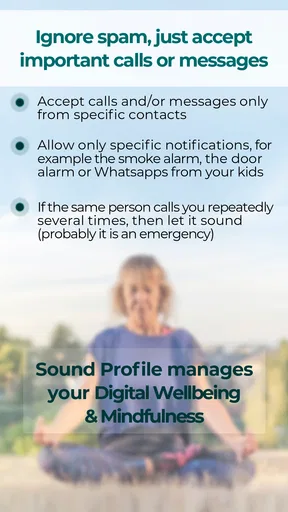
At the start, I’d keep the setup modest. A quiet-work profile, an everyday profile, and a nighttime one are more useful than a long collection of profiles with names I’ll forget. The key is choosing levels that solve a real problem: for example, lowering notifications without making calls impossible to hear. The app’s central distinction—handling call and notification volume separately—matters most when I want to stay reachable without letting every alert take over the room.
Sound Profile is rated for Everyone and has been around since May 18, 2012, so it is not a new experiment in the personalization space. It has a 3.7 average from around 16,000 ratings, with roughly 2,300 written reviews, and more than a million installs. Those figures suggest a long-running utility with an audience, not a guarantee that its controls will suit every phone or routine. I’d treat the first few days as a practical test: does the chosen profile leave calls audible, keep notifications civil, and avoid creating new surprises?
Month-to-month value depends on fewer interventions
The real payoff is not the novelty of building profiles; it is having to think about volume less often. If I move between predictable environments, profiles can turn small repeated adjustments into a simple habit. A weekday routine might mean a restrained setting during focused work and a more audible one afterward. Someone who works shifts, studies in shared spaces, or regularly visits places where a loud ringtone is unwelcome may find that separation especially useful.
A realistic day shows both the convenience and the limits. I leave home with a normal sound level, arrive at work, and switch to a quieter profile before settling in. Later, I head out and need calls to be easy to hear again. If the change is automatic and dependable on my device, it removes a minor task from the day. If I still have to check every volume setting because I don’t trust the switch, the app has not yet earned its place in my routine.
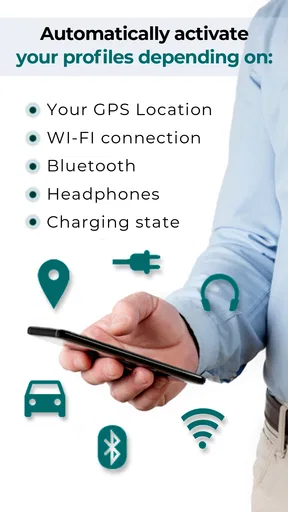
For automatic changes, I would start with one trigger rather than trying to automate every part of the day at once. A calendar-linked profile makes sense for scheduled meetings, while a location-based one is more relevant when I repeatedly visit the same place. These approaches suit different habits: a calendar can reflect what I’m doing, while location reflects where I am. Neither is automatically better, and a manual profile may be the more dependable choice for irregular plans.
Worth Reading Before You Choose

EA SPORTS FC Mobile 26 Is a Bigger Football Game, but It Takes Time

Flipboard Shows What News Apps Must Do Beyond the Feed

Switching to Android Auto Means Rethinking Your Driving Routine

Google Calendar Makes a Crowded Week Easier to Manage

Ludo King Makes the Most of the Minutes Between Plans

Baby Panda World Brings Quick Play to Modern Phones, but Its Game Library Feels Busy
Maintenance: make the setup easy to trust
Any profile tool needs a little care. A setting that was sensible last month can become inconvenient when a work schedule changes or a familiar routine disappears. I’d review profiles after a change in daily habits and remove or rename ones that no longer make immediate sense. Clear names help more than clever ones: “Meeting” or “Night” is easier to identify in a hurry than an inside joke or a vague label.
I’d also test each profile in the situation it is meant for. A quiet setting should be checked before relying on it for a full workday, and a nighttime setting should be checked before trusting it to preserve the sounds I need. This is especially important when call and notification levels are being treated differently. The useful question is not whether a profile looks tidy in a menu, but whether it behaves as intended when a real call or alert arrives.
Sound Profile is on version 12.91 and requires Android 9 or later. Because phone makers and system versions can affect how volume controls behave, I would verify the result on my own device instead of assuming every profile will work identically everywhere. The app’s basic role is clear, but any automation should be treated as something to test rather than set and forget. That small check is a fair trade if it prevents an embarrassing ring or an overlooked call.
Where alternatives may be better
The simplest alternative is to use the phone’s built-in volume controls and change them manually. That is a perfectly good choice if I only adjust sound occasionally or prefer not to maintain profiles. Built-in settings also avoid the extra setup of a separate personalization app. Sound Profile becomes more compelling when the same adjustments recur often enough that making them one by one feels like needless housekeeping.
There is also a trade-off between automation and certainty. A calendar or location trigger can reduce effort, but a manually selected profile may be easier to trust when plans change at short notice. I would not build a complicated chain of profiles just because the options invite experimentation. A small set that behaves predictably is more valuable than a clever setup that needs constant checking. If I need broad device automation beyond sound, a general automation tool may be a better fit; if I only need one quick volume change, the phone’s own controls are simpler.
Who should keep it—and who should skip it
I can see Sound Profile earning a place on a phone used across distinct settings: a shared office, a classroom, a quiet home, or a routine that includes scheduled meetings. It is also a sensible option for anyone who wants calls and notifications to have different levels rather than treating all sound as one decision. The strongest case is a repeated problem that can be described plainly: “I need calls audible, but alerts quieter while I’m working.”
I would skip it if my volume habits are already simple, if I rarely move between sound environments, or if I dislike maintaining custom settings. It is also not the right answer for someone expecting every transition to be automatic without testing. The free download makes it accessible to try, while optional purchases range from $0.99 to $6.49 per item; I’d first decide whether the free experience solves the everyday problem before considering any purchase.
Getting Started with Sound Profile
First things first, downloading Sound Profile is a breeze. It’s available for both Android and iOS, so you’re covered no matter what device you’re using. Once installed, the app welcomes you with a clean and straightforward interface. You don’t need to be a tech wizard to navigate through it, which I totally appreciate. It’s all about making things easy, right?
Setting Up Your Profiles
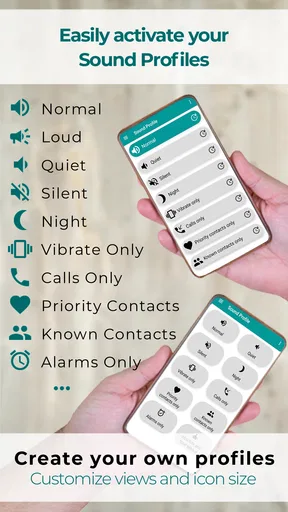
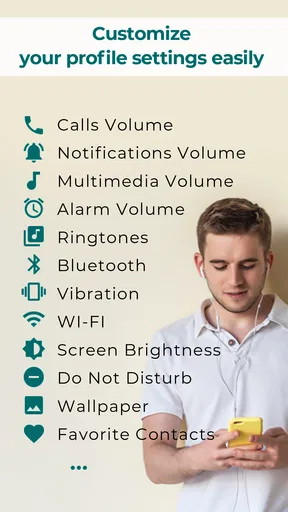
What I love about Sound Profile is its flexibility. You can create different sound profiles for various scenarios. Need your phone on silent during work hours? Done. Want it to blast your favorite tunes after hours? Easy peasy. The app allows you to customize each profile with specific volume levels for ringtones, notifications, media, and alarms. It’s like having a magic wand for your phone’s volume settings.
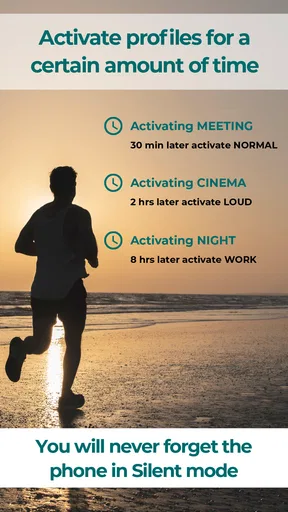
Setting up a new profile is as simple as tapping a few buttons. You can name your profile, choose the sound levels, and even set specific times for it to activate automatically. This feature is a game-changer for someone like me who tends to forget to switch my phone to silent mode before meetings.
Extra Features That Stand Out
Aside from the basic profiles, Sound Profile offers some nifty features that caught my attention. One of them is the ability to link profiles to your calendar events. Imagine your phone automatically going silent when you step into a meeting marked on your calendar. No more scrambling to silence it last minute!
Another cool feature is the location-based profiles. The app can change your phone’s volume settings based on your location. So, if you regularly visit the gym, your phone can automatically switch to a workout profile when you arrive. It’s these little conveniences that make life smoother.
User Experience and Interface
The user interface is intuitive and user-friendly. Everything you need is right there without needing to dig through complicated menus. The design is sleek and modern, which makes the whole experience pleasant. And if you’re worried about battery usage, rest easy. The app is optimized to run efficiently in the background without draining your battery life.
Why You Might Love It
For anyone who juggles different environments throughout the day, Sound Profile is a must-have. It takes the guesswork out of managing your phone’s sound settings, allowing you to focus on what really matters. No more fumbling with volume controls or missing calls because your phone is too quiet. It’s like having a personal assistant that ensures your phone behaves just the way you need it to.
Moreover, it’s great for those who attend a lot of meetings, like me, or those who move between different locations. The app takes care of adjusting your phone’s settings seamlessly, so you don’t have to worry about a thing.
Conclusion
So, there you have it. Sound Profile is a handy tool that adds a layer of convenience to your daily routine. It’s simple, effective, and incredibly helpful for managing your phone’s sound settings. If you’ve ever found yourself in an embarrassing situation due to your phone’s volume, this app is definitely worth a try.
Download it today and experience the difference it can make. Whether you’re a busy professional or just someone who appreciates a well-organized phone, Sound Profile has got you covered.
Pros
- User-friendly interface for easy navigation.
- Custom profiles for different sound settings.
- Automatic profile switching based on location.
- Widgets for quick access to profiles.
- Battery-efficient design with low power usage.
Cons
- Limited free version features.
- No integration with smart home devices.
- Occasional bugs in profile switching.
- Ads can be intrusive at times.
- Not all devices supported for full features.
FAQs for Sound Profile (Volume control)
What is Sound Profile and how does it work?
Sound Profile is an app designed to manage and customize your device’s volume settings efficiently. It allows users to create personalized sound profiles that automatically adjust based on time, location, or specific events. The app integrates seamlessly with your phone’s settings to ensure that you never miss an important call or notification due to incorrect volume settings.
Can I schedule sound profiles in advance?
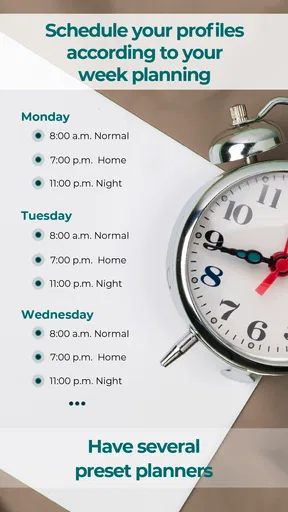
Yes, Sound Profile allows users to schedule sound profiles in advance. This feature is particularly useful for setting different sound schemes for various times of the day, such as quiet modes during meetings or louder settings for outdoor activities. The scheduling is flexible and can be adjusted to fit your daily routine with ease.
Does Sound Profile affect battery life significantly?
Sound Profile is designed to be efficient and should not have a significant impact on your device’s battery life. It operates in the background, using minimal resources to manage your volume settings. However, like any app that runs continuously, it may contribute to slight battery usage, but it is generally negligible.
Is Sound Profile compatible with all Android and iOS devices?
Sound Profile is compatible with a wide range of Android and iOS devices. However, it’s always a good idea to check the app’s specifications on the app store to ensure compatibility with your specific device model and operating system version. Regular updates help maintain compatibility with the latest devices and OS updates.
Are there any in-app purchases or subscription fees involved?
Sound Profile offers both free and premium versions. The free version includes basic features, while the premium version provides advanced functionalities such as unlimited profiles and more customization options. In-app purchases might also be available for additional features or enhancements. Users can choose based on their needs and preferences.


